15:00
Quarto projects for advanced content
Enhancing scientific publishing through Quarto
Christophe Dervieux
Posit
July 8, 2024
Projet Quarto ?
Quarto projects are directories that provide :
- a way to
renderall or part of the files in a directory using a single command (for example,quarto render myproject). - A means of sharing YAML configuration between several documents.
- The ability to redirect output artifacts to another directory.
- The ability to freeze rendering (i.e. not re-run documents unless they have changed).
We’ve already created a project…
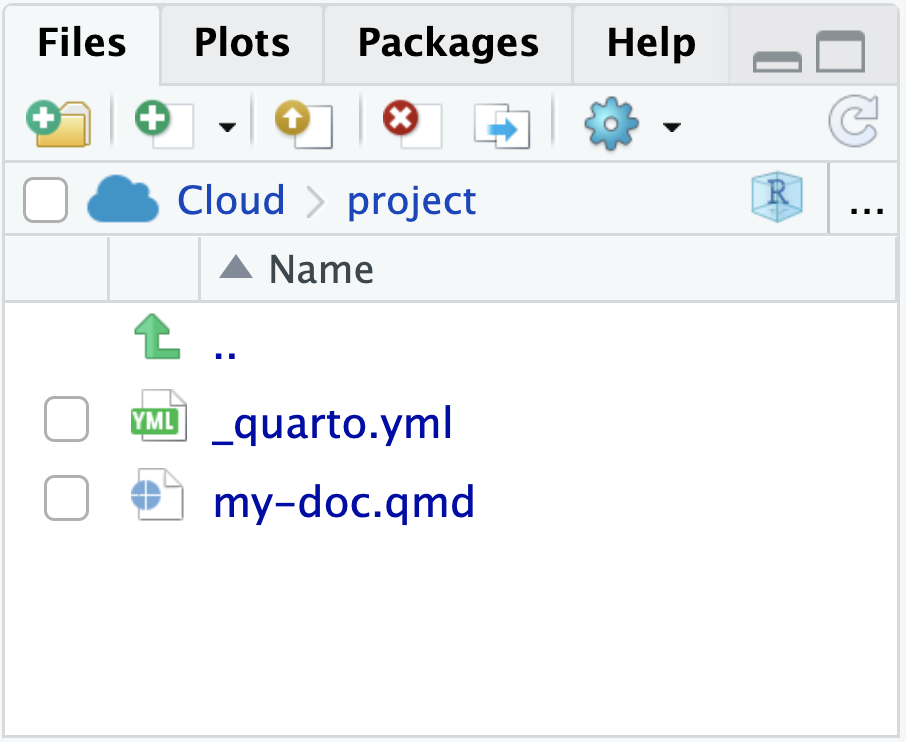
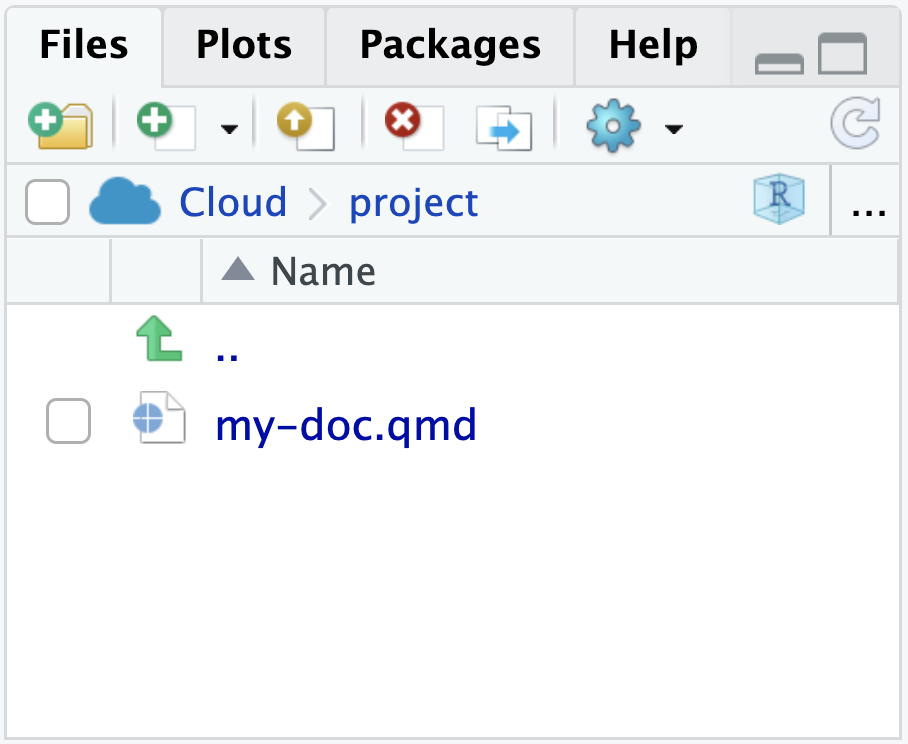
A project is a directory with a _quarto.yml, no matter how simple.
This is a Quarto Project.
This is not.
Which projects can be created ?
Projects can have special “types” that introduce additional behavior (for example, websites or books).
Quarto Website
Websites are essentially
format: html+ a Quarto Project fileBut a website is different than
format: htmlin that it has multiple pagesArbitrary depth and organization of content
Multi-level navigation (navigation bar / sidebar / hybrid)
Full-text search (client-side or Algolia)
Freeze calculation results (
freezeconfiguration)
Quarto Website
Quarto Blogs
Websites and books are very similar in that they associate multiple pages/resources into a connected resource
Inherits Quarto site functionalities (navigation, search, etc.)
Automatically generated list and RSS feeds
Customizable home page (inspired by the R package postcards)
multi-formats
Quarto Books
- Inherits Quarto site functionalities (navigation, search, etc.)
- Supports cross-referencing between chapters
- Output formats include HTML, PDF, MS Word and ePub.
Quarto Books
And much more…
Example: A complex _quarto.yml
_quarto.yml
project:
type: website
output-dir: _site
resources:
- "/docs/download/_download.json"
- "/docs/download/_prerelease.json"
- "/_redirects"
website:
title: "Quarto"
image: "quarto-dark-bg.jpeg"
favicon: "favicon.png"
google-analytics: "G-FV9Z7SDZ0M"
open-graph: true
twitter-card: true
site-url: https://quarto.org
repo-url: https://github.com/quarto-dev/quarto-web
issue-url: https://github.com/quarto-dev/quarto-cli/issues/new/choose
repo-actions: [edit, issue]
page-navigation: true
bread-crumbs: true
search:
show-item-context: true
type: overlay
algolia:
index-name: prod_QUARTO
application-id: ZPJB5I1QN7
search-only-api-key: 41be6c1e0a7fea4a51b107810facf577
analytics-events: true
show-logo: true
page-footer:
left: |
Proudly supported by
[{fig-alt="Posit" width=65px}](https://posit.co)
center:
- text: "About"
href: about.qmd
- text: "FAQ"
href: docs/faq/index.qmd
- text: "License"
href: license.qmd
- text: "Trademark"
href: trademark.qmd
right:
- icon: twitter
href: https://twitter.com/quarto_pub
aria-label: Quarto Twitter
- icon: github
href: https://github.com/quarto-dev/quarto-cli
aria-label: Quarto GitHub
- icon: rss
href: https://quarto.org/docs/blog/index.xml
aria-label: Quarto Blog RSS
navbar:
background: light
logo: quarto.png
logo-alt: "Quarto logo."
title: false
collapse-below: lg
left:
- text: "Overview"
href: index.qmd
- text: "Get Started"
href: docs/get-started/index.qmd
- text: "Guide"
href: docs/guide/index.qmd
- text: Extensions
href: docs/extensions/index.qmd
- text: "Reference"
href: docs/reference/index.qmd
- text: "Gallery"
href: docs/gallery/index.qmd
- text: "Blog"
href: docs/blog/index.qmd
- text: "Help"
menu:
- text: "Report a Bug"
icon: "bug"
href: "https://github.com/quarto-dev/quarto-cli/issues"
- text: "Ask a Question"
icon: "chat-right-text"
href: "https://github.com/quarto-dev/quarto-cli/discussions"
- text: "FAQ"
icon: "question-circle"
href: docs/faq/index.qmd
tools:
- icon: twitter
href: https://twitter.com/quarto_pub
text: Quarto Twitter
- icon: github
href: https://github.com/quarto-dev/quarto-cli
text: Quarto GitHub
- icon: rss
href: https://quarto.org/docs/blog/index.xml
text: Quarto Blog RSS
sidebar:
- id: get-started
title: "Get Started"
style: "floating"
collapse-level: 2
align: left
contents:
- docs/get-started/index.qmd
- text: "Tutorial: Hello, Quarto"
href: docs/get-started/hello/
- text: "Tutorial: Computations"
href: docs/get-started/computations/
- text: "Tutorial: Authoring"
href: docs/get-started/authoring/
- id: guide
collapse-level: 1
contents:
- section: "Guide"
href: docs/guide/index.qmd
contents:
- section: "Authoring"
contents:
- docs/authoring/markdown-basics.qmd
- docs/authoring/figures.qmd
- docs/authoring/tables.qmd
- docs/authoring/diagrams.qmd
- docs/authoring/videos.qmd
- text: "Jupyter Notebooks"
href: docs/authoring/notebook-embed.qmd
- docs/authoring/callouts.qmd
- docs/authoring/code-annotation.qmd
- docs/authoring/article-layout.qmd
- section: "Scholarly Writing"
contents:
- docs/authoring/front-matter.qmd
- docs/authoring/title-blocks.qmd
- docs/authoring/footnotes-and-citations.qmd
- docs/authoring/cross-references.qmd
- docs/authoring/create-citeable-articles.qmd
- docs/authoring/appendices.qmd
- section: "Computations"
contents:
- docs/computations/python.qmd
- docs/computations/r.qmd
- docs/computations/julia.qmd
- docs/computations/ojs.qmd
- docs/computations/execution-options.qmd
- docs/computations/parameters.qmd
- section: "Tools"
contents:
- section: "JupyterLab"
contents:
- text: "JupyterLab Basics"
href: docs/tools/jupyter-lab.qmd
- text: "JupyterLab Extension"
href: docs/tools/jupyter-lab-extension.qmd
- section: "RStudio IDE"
contents:
- text: "RStudio Basics"
href: docs/tools/rstudio.qmd
- section: "Visual Editor"
href: docs/visual-editor/index.qmd
contents:
- text: Editor Basics
href: docs/visual-editor/index.qmd
- docs/visual-editor/technical.qmd
- docs/visual-editor/content.qmd
- docs/visual-editor/options.qmd
- docs/visual-editor/markdown.qmd
- section: "VS Code"
href: docs/tools/vscode.qmd
contents:
- text: "VS Code Basics"
href: docs/tools/vscode.qmd
- text: "Visual Editor"
href: docs/visual-editor/vscode/index.qmd
- text: "Notebook Editor"
href: docs/tools/vscode-notebook.qmd
- docs/tools/neovim.qmd
- docs/tools/text-editors.qmd
- section: "Documents"
contents:
- section: "HTML"
contents:
- docs/output-formats/html-basics.qmd
- docs/output-formats/html-code.qmd
- docs/output-formats/html-themes.qmd
- docs/output-formats/html-multi-format.qmd
- docs/output-formats/html-publishing.qmd
- section: "PDF"
contents:
- docs/output-formats/pdf-basics.qmd
- docs/output-formats/pdf-engine.qmd
- section: "MS Word"
contents:
- docs/output-formats/ms-word.qmd
- docs/output-formats/ms-word-templates.qmd
- section: "Markdown"
contents:
- docs/output-formats/gfm.qmd
- docs/output-formats/hugo.qmd
- docs/output-formats/docusaurus.qmd
- docs/output-formats/all-formats.qmd
- section: "Presentations"
contents:
- text: "Overview"
href: docs/presentations/index.qmd
- section: docs/presentations/revealjs/index.qmd
contents:
- text: "Reveal Basics"
href: docs/presentations/revealjs/index.qmd
- docs/presentations/revealjs/presenting.qmd
- docs/presentations/revealjs/advanced.qmd
- docs/presentations/revealjs/themes.qmd
- docs/presentations/powerpoint.qmd
- docs/presentations/beamer.qmd
- section: "Websites"
href: docs/websites/website-basics.qmd
contents:
- docs/websites/website-basics.qmd
- docs/websites/website-navigation.qmd
- docs/websites/website-blog.qmd
- docs/websites/website-search.qmd
- docs/websites/website-tools.qmd
- docs/websites/website-about.qmd
- section: "Listing Pages"
href: docs/websites/website-listings.qmd
contents:
- docs/websites/website-listings.qmd
- docs/websites/website-listings-custom.qmd
- section: "Books"
href: docs/books/book-basics.qmd
contents:
- docs/books/book-basics.qmd
- docs/books/book-structure.qmd
- docs/books/book-crossrefs.qmd
- text: "Customizing Output"
href: docs/books/book-output.qmd
- section: "Interactivity"
contents:
- text: "Overview"
href: docs/interactive/index.qmd
- section: docs/interactive/ojs/index.qmd
contents:
- text: "Introduction"
href: docs/interactive/ojs/index.qmd
- docs/interactive/ojs/libraries.qmd
- docs/interactive/ojs/data-sources.qmd
- docs/interactive/ojs/ojs-cells.qmd
- docs/interactive/ojs/shiny.qmd
- docs/interactive/ojs/code-reuse.qmd
- section: "Examples"
contents:
- docs/interactive/ojs/examples/penguins.qmd
- docs/interactive/ojs/examples/sunburst.qmd
- docs/interactive/ojs/examples/arquero.qmd
- docs/interactive/ojs/examples/population.qmd
- docs/interactive/ojs/examples/noaa-co2.qmd
- docs/interactive/ojs/examples/github.qmd
- docs/interactive/ojs/examples/layout.qmd
- section: "Shiny"
contents:
- text: "K-Means"
href: https://jjallaire.shinyapps.io/kmeans-shiny-ojs/
- text: "Binning"
href: https://jjallaire.shinyapps.io/binning-shiny-ojs/
- text: "Data Binding"
href: https://jjallaire.shinyapps.io/data-shiny-ojs/
- text: "Covid Map"
href: https://jjallaire.shinyapps.io/covid19-bicartogram/
- section: docs/interactive/shiny/index.qmd
contents:
- text: "Introduction"
href: docs/interactive/shiny/index.qmd
- docs/interactive/shiny/running.qmd
- docs/interactive/shiny/execution.qmd
- docs/interactive/shiny/resources.qmd
- section: "Examples"
contents:
- text: "Old Faithful"
href: https://jjallaire.shinyapps.io/shiny-old-faithful/
- text: "K-Means"
href: https://jjallaire.shinyapps.io/shiny-k-means/
- text: "Diamonds"
href: https://jjallaire.shinyapps.io/shiny-diamonds/
- section: "Widgets"
contents:
- docs/interactive/widgets/jupyter.qmd
- docs/interactive/widgets/htmlwidgets.qmd
- docs/interactive/layout.qmd
- section: "Publishing"
contents:
- docs/publishing/index.qmd
- docs/publishing/quarto-pub.qmd
- docs/publishing/github-pages.qmd
- docs/publishing/rstudio-connect.qmd
- docs/publishing/netlify.qmd
- docs/publishing/confluence.qmd
- docs/publishing/other.qmd
- text: "Publishing with CI"
href: docs/publishing/ci.qmd
- section: "Projects"
contents:
- docs/projects/quarto-projects.qmd
- docs/projects/code-execution.qmd
- docs/projects/profiles.qmd
- docs/projects/environment.qmd
- docs/projects/scripts.qmd
- docs/projects/virtual-environments.qmd
- section: "Advanced"
contents:
- docs/authoring/includes.qmd
- docs/authoring/variables.qmd
- docs/output-formats/page-layout.qmd
- docs/authoring/language.qmd
- docs/authoring/conditional.qmd
- docs/extensions/nbfilter.qmd
- id: extensions
title: "Extensions"
contents:
- "---"
- section: docs/extensions/index.qmd
contents:
- text: "Shortcodes & Filters"
href: docs/extensions/listing-filters.qmd
- text: "Journal Articles"
href: docs/extensions/listing-journals.qmd
- text: "Custom Formats"
href: docs/extensions/listing-formats.qmd
- text: "Revealjs Extensions"
href: docs/extensions/listing-revealjs.qmd
- docs/extensions/managing.qmd
- "---"
- section: docs/extensions/creating.qmd
contents:
- text: "Overview"
href: docs/extensions/creating.qmd
- docs/extensions/lua.qmd
- docs/extensions/lua-api.qmd
- text: "Distribution"
href: docs/extensions/distributing.qmd
- "---"
- text: "Shortcodes"
href: docs/extensions/shortcodes.qmd
- text: "Filters"
href: docs/extensions/filters.qmd
- section: "Journal Articles"
href: docs/journals/formats.qmd
contents:
- docs/journals/formats.qmd
- docs/journals/templates.qmd
- docs/journals/authors.qmd
- docs/extensions/formats.qmd
- docs/extensions/revealjs.qmd
- docs/extensions/project-types.qmd
- docs/extensions/starter-templates.qmd
- id: manuscripts
title: "Manuscripts"
style: "floating"
collapse-level: 2
align: left
contents:
- text: Manuscripts Overview
href: docs/manuscripts/index.qmd
- text: "Authoring Manuscripts"
contents:
- text: Jupyter Lab
href: docs/manuscripts/authoring/jupyterlab.qmd
- text: VS Code
href: docs/manuscripts/authoring/vscode.qmd
- text: RStudio
href: docs/manuscripts/authoring/rstudio.qmd
- text: "Publishing Manuscripts"
href: docs/manuscripts/publishing.qmd
- text: "Next Steps"
href: docs/manuscripts/next-steps.qmd
- text: "---"
- text: "Manuscript Components"
href: docs/manuscripts/components.qmd
- id: reference
title: "Reference"
collapse-level: 3
contents:
- section: "Reference"
href: docs/reference/index.qmd
contents:
- section: "Formats"
contents:
- text: "HTML"
href: docs/reference/formats/html.qmd
- text: "PDF"
href: docs/reference/formats/pdf.qmd
- text: "MS Word"
href: docs/reference/formats/docx.qmd
- text: "OpenOffice"
href: docs/reference/formats/odt.qmd
- text: "ePub"
href: docs/reference/formats/epub.qmd
- section: "Presentations"
contents:
- text: "Revealjs"
href: docs/reference/formats/presentations/revealjs.qmd
- text: "PowerPoint"
href: docs/reference/formats/presentations/pptx.qmd
- text: "Beamer"
href: docs/reference/formats/presentations/beamer.qmd
- section: "Markdown"
contents:
- text: "GitHub"
href: docs/reference/formats/markdown/gfm.qmd
- text: "CommonMark"
href: docs/reference/formats/markdown/commonmark.qmd
- text: "Markua"
href: docs/reference/formats/markdown/markua.qmd
- section: "Wikis"
contents:
- text: "MediaWiki"
href: docs/reference/formats/wiki/mediawiki.qmd
- text: "DokuWiki"
href: docs/reference/formats/wiki/dokuwiki.qmd
- text: "ZimWiki"
href: docs/reference/formats/wiki/zimwiki.qmd
- text: "Jira Wiki"
href: docs/reference/formats/wiki/jira.qmd
- text: "XWiki"
href: docs/reference/formats/wiki/xwiki.qmd
- section: "More Formats"
contents:
- text: "JATS"
href: docs/reference/formats/jats.qmd
- text: "Jupyter"
href: docs/reference/formats/ipynb.qmd
- text: "ConTeXt"
href: docs/reference/formats/context.qmd
- text: "RTF"
href: docs/reference/formats/rtf.qmd
- text: "reST"
href: docs/reference/formats/rst.qmd
- text: "AsciiDoc"
href: docs/reference/formats/asciidoc.qmd
- text: "Org-Mode"
href: docs/reference/formats/org.qmd
- text: "Muse"
href: docs/reference/formats/muse.qmd
- text: "GNU TexInfo"
href: docs/reference/formats/texinfo.qmd
- text: "Groff Man Page"
href: docs/reference/formats/man.qmd
- text: "Groff Manuscript"
href: docs/reference/formats/ms.qmd
- text: "Haddock markup"
href: docs/reference/formats/haddock.qmd
- text: "OPML"
href: docs/reference/formats/opml.qmd
- text: "Textile"
href: docs/reference/formats/textile.qmd
- text: "DocBook"
href: docs/reference/formats/docbook.qmd
- text: "InDesign"
href: docs/reference/formats/icml.qmd
- text: "TEI Simple"
href: docs/reference/formats/tei.qmd
- text: "FictionBook"
href: docs/reference/formats/fb2.qmd
- section: "Code Cells"
href: docs/reference/cells/index.qmd
contents:
- text: "Jupyter"
href: docs/reference/cells/cells-jupyter.qmd
- text: "Knitr"
href: docs/reference/cells/cells-knitr.qmd
- text: "Observable"
href: docs/reference/cells/cells-ojs.qmd
- section: "Projects"
contents:
- text: "Options"
href: docs/reference/projects/options.qmd
- text: "Websites"
href: docs/reference/projects/websites.qmd
- text: "Books"
href: docs/reference/projects/books.qmd
- section: "More"
contents:
- text: "Dates"
href: docs/reference/dates.qmd
- text: "Globs"
href: docs/reference/globs.qmd
- text: "Citations"
href: docs/reference/metadata/citation.qmd
- id: prerelease
title: "Quarto 1.3"
contents:
- section: "Highlights"
href: docs/prerelease/1.3/index.qmd
contents:
- text: "Confluence Publishing"
href: docs/publishing/confluence.qmd
- text: "Multi-Format"
href: docs/output-formats/html-multi-format.qmd
- text: "Cell Embedding"
href: docs/authoring/notebook-embed.qmd
- text: "Grid Customization"
href: docs/output-formats/page-layout.qmd#grid-customization
- text: "Code Annotation"
href: docs/authoring/code-annotation.qmd
- section: "Quarto AST"
href: docs/prerelease/1.3/ast.qmd
contents:
- text: Callouts
href: docs/prerelease/1.3/custom-ast-nodes/callout.qmd
- text: Tabsets
href: docs/prerelease/1.3/custom-ast-nodes/tabset.qmd
- text: Conditional Blocks
href: docs/prerelease/1.3/custom-ast-nodes/conditional-block.qmd
- text: "Mermaid Theming"
href: docs/authoring/diagrams.qmd#mermaid-theming
- text: "PDF Images"
href: docs/prerelease/1.3/pdf.qmd
- text: "`kbd` Shortcode"
href: docs/authoring/markdown-basics.qmd#keyboard-shortcuts
bibliography: references.bib
format:
html:
toc: true
theme:
light: [cosmo, theme.scss]
code-copy: true
code-overflow: wrap
css: styles.css
include-after-body: js.html
grid:
sidebar-width: 250px
body-width: 900px
margin-width: 300px
filters:
- filters/tools-tabset.lua
freeze: true
editor: visual
profile:
group:
- [prerelease,rc]Our turn
Let’s turn our project into a website
- Add an
index.qmdto your existingQuarto-101project with atitleand some content. - Modify the
_quarto.ymlto make a website - Set a theme for our website
quarto previewto see website evolve
Your turn!
Turn your project into a website
- Add navigation to display your
new-penguins.qmdreport in a submenu of thenavbar- Tips: Remove
themekey at document level.
- Tips: Remove
- Customize your website configuration (theme, navbar, sidebar, …)!
- Add more content like an About page
Learn to navigate in the doc!
Use the Quarto documentation on the website type to play with the options: https://quarto.org/docs/websites/
Computations
When should code be re-run?
You might have a reason to re-run all code in a Quarto website (every single chunk in every single document) every time you render the website.
But, chances are, that’s not what you want.
Just playing around styling – you probably don’t want to run the code again
Changed some code in a document – you probably want to re-run the code in that document, but not necessarily others
Made a big change affecting computations on many or all pages – you probably want to re-run all code
freezeandcacheoptions give you fine control over these decisions
Freeze
The freeze option controls when/if computational documents be re-rendered during a global project render:
Freeze
The
freezeoption is typically added to a_metadata.ymlfile within a specific directory, affecting all files in that directory. Shared MetadataIt can also be set a root level for the whole website in
_quarto.ymlYou can have it only within specific subdirectories for more complex sites.
Cache
Quarto relies on computation engine’s caching mechanism, i.e. for
engine: knitrand R .qmd document, knitr caching mechanism is used.Cache stores the results of computations for a specific file.
Cache invalidation is triggered by changes in chunk source code (or other cache attributes you’ve defined).
cachecan also be set at the chunk level. Consider using the cache for computationally expensive chunks.
Freeze vs. cache
Freeze option is typically set
for the whole website in
_quarto.yml, orfor files within a directory in
_metadata.ymlin that directory
Freeze vs. cache
- Cache option is typically set for a given file or for individual chunk(s) in a file.
or
Our turn!
Let’s play with cache and freeze
- Setting
freeze: trueandfreeze: auto - Setting
cache: trueon computation cells
Learn about quarto incremental rendering
Rendering project can be done as a whole, or per document, learn more at: https://quarto.org/docs/projects/quarto-projects.html#rendering-projects
Publishing
Built-in publish mechanism
❯ quarto publish --help

Usage:   quarto publish [provider] [path]
Version: 1.5.53

Description:

  Publish a document or project to a provider.

  Available providers include:

   - Quarto Pub (quarto-pub)
   - GitHub Pages (gh-pages)
   - Posit Connect (connect)
   - Posit Cloud (posit-cloud)
   - Netlify (netlify)
   - Confluence (confluence)
   - Hugging Face Spaces (huggingface)

  Accounts are configured interactively during publishing.
  Manage/remove accounts with: quarto publish accounts
More details at https://quarto.org/docs/publishing/
Quarto Pub
Quarto Pub is a free publishing service for content created with Quarto. It is ideal for blogs, course or project websites, books, presentations, and personal hobby sites.
Publish with
quarto publish:
- Gain a
_publish.ymlthat is safe to check into version control.
Our turn!
Let’s publish !
quarto publish quarto-pub
Want to try it yourself ?
You need to create an account first at https://quartopub.com/
Questions ?
Let’s recap…